IESCO Online Bill 2026 Check & Download Duplicate Bill
Check your IESCO bill using the 14-digit reference number or 10-digit Customer ID printed on your bill. Select the matching input type and press Submit. The official PITC bill page opens in a new tab, where you can view and print the available bill.
Check IESCO Bill Online
Independent website: iescobillsonline.pk is not affiliated with IESCO, PITC or any government body. The checker opens the official PITC bill portal in a new tab. We do not collect bill payments or provide an archive of past monthly bill copies.
For residents of Islamabad and Rawalpindi, this is especially useful, since you no longer have to wait for a paper bill to know what you owe. Stay ahead of due dates, avoid late payment fees and manage your household budget more confidently with instant access to your IESCO bill, anytime and anywhere.
About IESCO
The Islamabad Electric Supply Company was established in 1998 taking over electricity distribution responsibilities from the former Islamabad Area Electricity Board, which previously operated under WAPDA. Today IESCO manages the supply, distribution and sale of electricity across a vast region stretching from Attock to Jhelum and from the Indus River all the way to the Neelum River in Kashmir covering areas including Rawalpindi and Chakwal.
The company directly serves over 4.1 million consumers, impacting the daily lives of more than 25 million people across six districts. Beyond just supplying electricity, IESCO is committed to sustainable development and reducing its environmental footprint, while also prioritizing employee wellbeing through health programs, stress management initiatives and comprehensive healthcare coverage for staff and their families.
Areas Covered by IESCO
The IESCO supplies electricity across six major districts of northern Pakistan, including Islamabad Capital Territory, Rawalpindi, Attock, Chakwal, Jhelum and Taxila. From the bustling streets of Islamabad and Rawalpindi to smaller towns and rural communities, This network stretches from Attock in the west to Jhelum in the east, reaching homes, businesses, schools and industries throughout the region.
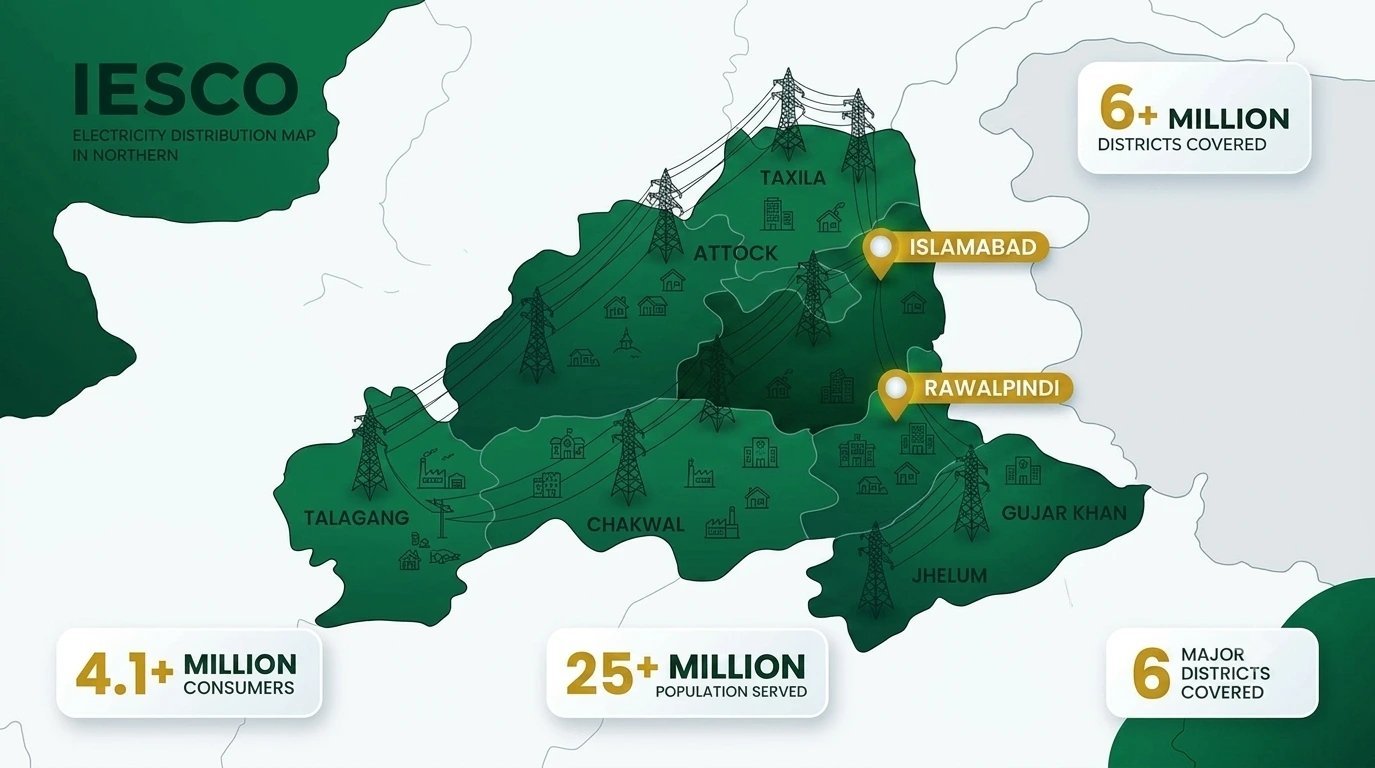
In total, IESCO powers more than 4.1 million consumers, directly impacting the lives of over 25 million people across its service area. Whether you live in the heart of Islamabad, the Cantt areas of Rawalpindi or smaller divisions like Taxila, Gujar Khan or Talagang, IESCO remains committed to providing reliable and uninterrupted electricity to every corner of its jurisdiction continuing to expand its network as the region grows.
IESCO Operational Circles
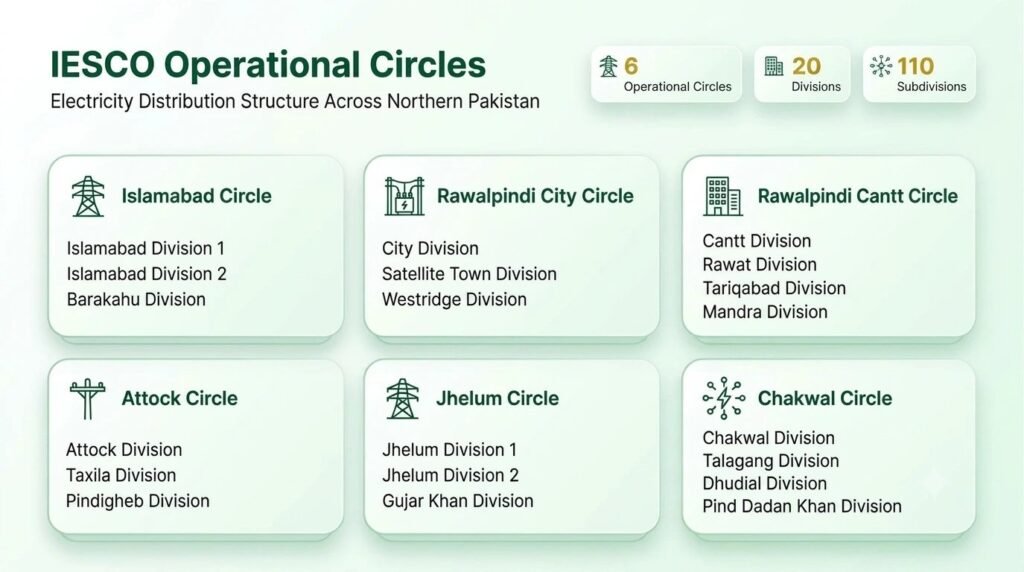
To ensure smooth electricity distribution and efficient customer service, IESCO operates through 6 Circles, 20 Divisions and 110 Subdivisions across its entire coverage area. Each circle oversees specific divisions, making it easier for consumers to reach out for billing, complaints or connection issues.
Circle-Wise Divisions:
- Islamabad Circle – Islamabad Division 1, Islamabad Division 2, Barakahu Division
- City Circle Rawalpindi – City Division, Satellite Town Division, Westridge Division
- Cantt Circle Rawalpindi – Cantt Division, Rawat Division, Tariqabad Division, Mandra Division
- Attock Circle – Attock Division, Taxila Division, Pindigheb Division
- Jhelum Circle – Jhelum Division 1, Jhelum Division 2, Gujar Khan Division
- Chakwal Circle – Chakwal Division, Talagang Division, Dhudial Division, Pind Dadan Khan Division
IESCO Structure
The Islamabad Electric Supply Company has been managing power distribution across northern Pakistan since 1998, covering a vast region that stretches from Attock to Jhelum and from the Indus River all the way to the Neelum River in Kashmir. To keep operations efficient and customer service close to home, IESCO is organized into Circles, Divisions and Sub-Divisions, each handling a specific administrative role.
Every Circle is headed by a Superintending Engineer (SE), while Divisions are run by Executive Engineers (XENs) and Sub-Divisions are managed by Sub-Divisional Officers (SDOs). A Customer Service Officer (CSO) is also assigned to each division to address consumer concerns directly. On a technical level IESCO operates over a hundred grid stations with a combined capacity of thousands of MVA, distributing electricity through hundreds of feeders across Rawalpindi, Chakwal, Attock, Jhelum and the federal capital Islamabad.
Why Checking Your IESCO Bill Online is Essential
Tired of waiting for your electricity bill, only to find it delayed, lost or missing altogether? It is frustrating and worse, it can make you miss your due date without even realizing it. That’s exactly why IESCO has made online bill checking the smarter, hassle-free alternative for every consumer.
| Benefit | Explanation |
|---|---|
| Convenience | Check your bill anytime, anywhere all you need is an internet connection. |
| Speed | View your latest bill the moment it’s uploaded, with zero postal delays. |
| Avoiding Late Fees | Plan your payment in advance and skip late charges or reconnection penalties. |
| Duplicate Bill Access | Lost your bill? Download or print a duplicate copy instantly. |
| Eco-Friendly | Less paper, less waste, a small step that helps the environment. |
| Stay Informed | Track your usage and charges throughout the month so nothing catches you off guard. |
Tip: Always check your bill a few days before the due date to stay safe from last-minute surprises.
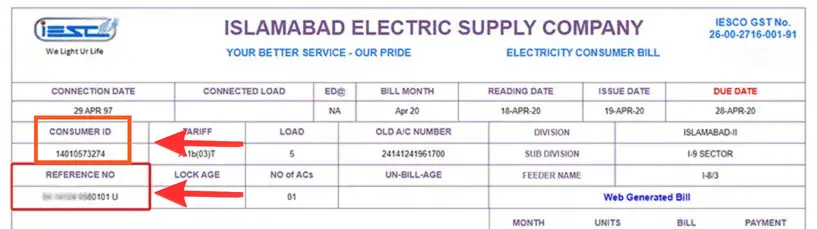
How to Find IESCO Consumer and Reference Number?
The Pakistan Water and Power Development Authority (WAPDA) assigns every consumer a unique Reference Number and Customer ID and you’ll need either one to check your bill online. Here’s where you can easily find them:
- Old Bill: Look at the top left corner of any previous bill your Reference Number and Customer ID are usually printed right there.
- IESCO Web Portal: Log in to the official IESCO portal, where your details are saved against your account.
- Nearest IESCO Office: Visit your local Customer Service Center (CSC) with your original CNIC and the staff will help you retrieve it on the spot.
How to Check IESCO Bill Online (Step-by-Step Guide)
Checking your IESCO bill online doesn’t require any account creation or password just your 14-digit reference number or Customer ID and you’re good to go. Here’s how it works:
- Enter your 14-digit Reference Number or Customer ID in the box above. You’ll find this number printed on the top left corner of your previous bill.
- Click the “Check Bill” button.
- Your bill will instantly appear on the screen, showing your current charges, due date and units consumed.
- From there, you can print it, download it as a PDF or save your reference number to check your bill again next time.
Note: Make sure to enter your reference number correctly without any spaces or extra characters. If the result is missing, follow our IESCO bill not showing troubleshooting guide.
Alternative Ways to Check Your Bill
If you’d like more options, you can also:
- Use mobile banking apps like Easypaisa, JazzCash or myABL to view your bill through their “Bill Payment” section.
- Register your mobile number with IESCO to receive your bill summary directly via SMS.
Tracking Old & Current Bills
Use the usage summary printed on your available official bill to compare consumption. Keep your own downloaded copies for a longer record. This website does not provide a searchable archive of previous monthly bill copies.
IESCO Electricity Bill Calculator
Use the IESCO bill calculator for an indicative planning estimate. Compare the result with your official bill; monthly adjustments, arrears and account-specific charges can change the amount payable.
Understanding IESCO Bill (Detailed Breakdown)
From the day your connection is installed, IESCO sends you a bill every month but understanding what’s actually written on it isn’t always straightforward. Between meter readings, units consumed, per-unit charges, surcharges and government taxes a typical bill can feel overwhelming if you don’t know what each section means. And missing these details can sometimes cost you more than you’d expect.
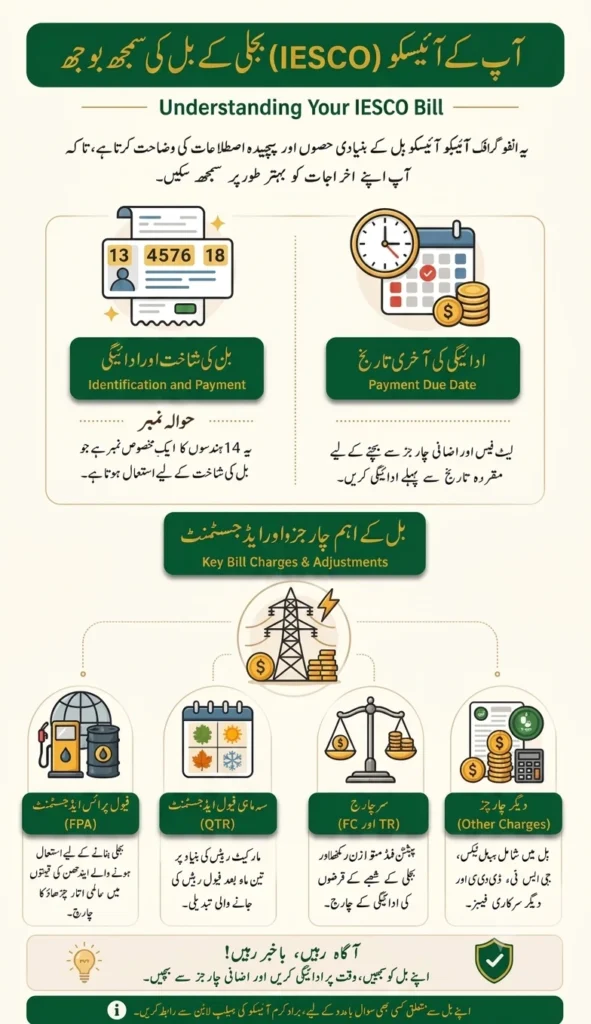
Here is a complete breakdown of the key terms and components you’ll come across on your IESCO bill:
- Connection Date – The date your IESCO connection was originally installed and registered in their system.
- Reference Number – Your unique account identifier used to check your bill make payments or request a duplicate copy anytime.
- Bill Dates – Found on the top right corner these include your meter reading date bill issue date and due date along with any penalty details for late payment.
- FPA (Fuel Price Adjustment) – Reflects changes in fuel costs used to generate electricity which is why your bill amount can shift from month to month.
- TR Surcharge (Tariff Rationalization) – Covers financial losses theft and recovery costs across the power sector. It balances the gap between NEPRA and government tariffs either through a subsidy or an additional surcharge.
- QTR Tariff Adj / DMC – A quarterly adjustment applied every three months. Domestic users are charged once they cross 300 units, while commercial and industrial consumers are charged from the very first unit.
- FC Surcharge (Financing Cost) – A small per-unit charge introduced to help repay loans taken by Power Holding Private Limited, originally set at 45 paise per unit.
- Electricity Duty – A provisional government tax calculated as a percentage of your variable electricity charges.
- Income Tax – Collected by IESCO on behalf of the government based on your electricity consumption.
- Meter Rent – Covers the cost of meter installation maintenance and reading services.
- Deferred Amount – The difference between your average estimated billing and your actual current usage.
- TV Fee – A fixed Rs. 36 charge collected to support Pakistan Television (PTV).
- Neelum-Jhelum Surcharge – A small charge of 10 paise per unit contributing to the Neelum-Jhelum Hydropower Project.
Meter Reading and Billing for IESCO Customers
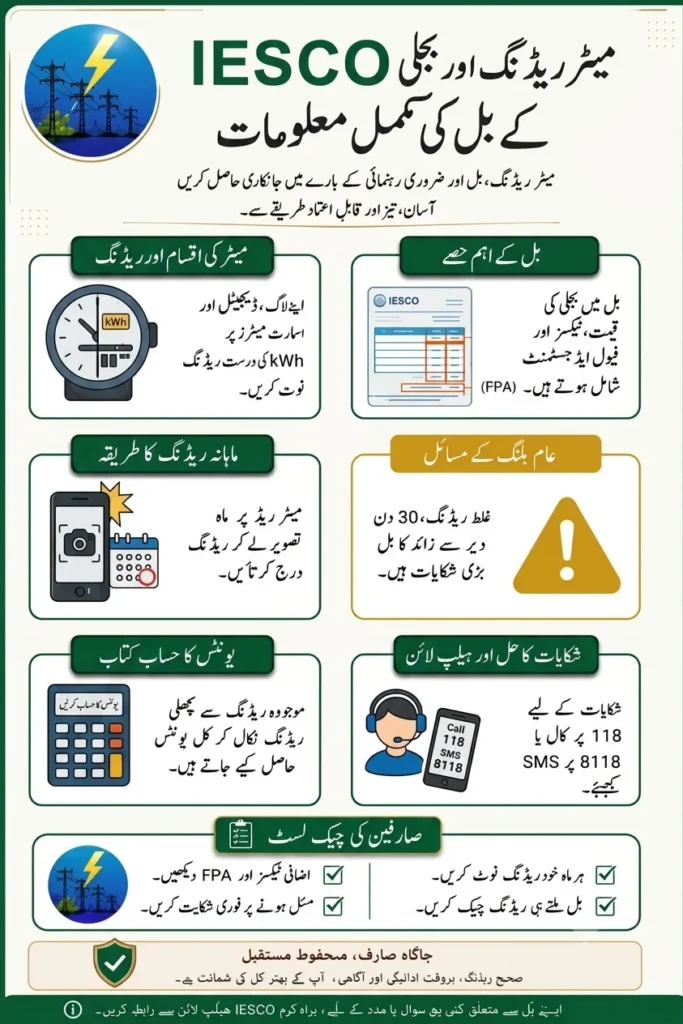
Ever wondered exactly how your IESCO bill amount is calculated each month? Understanding how meter reading and billing actually work can help you keep better track of your energy usage and even find ways to save on your unit costs. Take a look at the breakdown below to see exactly how each part of the process comes together. If you are comparing meter options, see our green meter guide and confirm the approved features with IESCO.
What to Do After Checking Your IESCO Bill
Once your IESCO bill is in front of you, the real work begins making sure it’s saved, verified and paid on time. Here a simple guide to help you handle it the right way. For the next step, read our IESCO bill payment guide.
1. Save or Download the Bill
Always download your bill in PDF format and keep it safely on your device. It works as proof of your charges and consumption, which can come in handy if there ever a dispute or you need it for budgeting and record-keeping later on.
2. Print a Copy (If Needed)
If you’re planning to pay in person, say, at a bank or post office it is a good idea to print a physical copy. It also helps if you like keeping a paper trail for your personal files.
3. Note Down the Due Date
Check the due date carefully and mark it somewhere you won’t miss. Paying before the deadline saves you from late fees, surcharges or even disconnection so don’t leave it for the last minute especially if you are paying through a bank or third-party app that may take time to process.
4. Choose Your Payment Method
IESCO bills can be paid through several secure and officially recognized channels, including:
- Bank Apps – HBL, UBL, MCB, Allied Bank, Bank Alfalah, Meezan Bank, Faysal Bank, Askari Bank, Standard Chartered, Bank of Punjab, JS Bank, Summit Bank, Soneri Bank, Dubai Islamic Bank and Sindh Bank
- Mobile Wallets – JazzCash and EasyPaisa, both officially authorized for IESCO payments
5. Double-Check the Details
Before closing the tab, take a moment to review:
- Units consumed
- Meter reading dates
- Total payable amount
This small step helps catch any billing errors early whether it is a wrong reading or an unexpected charge. You can also compare it with your previous bill or use a Bill Calculator Tool to cross check your usage and make sure everything adds up correctly.
How to Pay Your IESCO Bill Online & Offline
Paying your IESCO bill does not have to be a hassle. You have got plenty of convenient ways to do it whether you prefer going digital or sticking to traditional methods.
Online Payment Options
- Mobile Banking Apps – Pay directly through your bank app within seconds from wherever you are.
- E-Wallets – JazzCash, EasyPaisa and Upaisa make it easy to clear your bill straight from your phone.
- IESCO Official Portal/App – Use IESCO’s own website or mobile app to view and pay your bill securely in one place.
Offline Payment Options
- Bank Branches – Visit any authorized bank near you and pay your bill over the counter.
- Post Offices – Pakistan Post branches also accept IESCO bill payments for those who prefer paying in person.
Get IESCO Online Bill via SMS, Email and WhatsApp
No need to wait for a paper bill anymore. IESCO lets you receive your bill straight to your phone or inbox through multiple convenient channels.
| Service | How It Works |
|---|---|
| SMS Service | 8118 is an official complaint channel. Use the bill checker above to open the official PITC bill portal. |
| Email Service | Register your email through IESCO’s customer portal or support team and your bill will be sent directly to your inbox every month. |
How to Check IESCO Duplicate Bill
In today’s digital age, checking your IESCO bill online is by far the quickest and easiest way to stay on top of your electricity usage and payments. Whether you simply want to view your latest bill, understand the surcharges added to it or grab a duplicate copy because the original got misplaced, IESCO’s online system has you covered.
Here’s how you can check your bill in just a few simple steps:
- Visit the IESCO Portal – Open the official IESCO website or app on your phone or computer.
- Enter Your Reference Number or Consumer ID – Use the 14-digit reference number or your consumer ID both available on your previous bill.
- Select the Billing Month – If needed pick the specific month you want to view or download.
- View or Download – Your bill will appear instantly and you can save it as a PDF for your records.
What You’ll Need:
- Your Reference Number (found on any past bill)
- Your Consumer ID (your personal IESCO account number)
Lost Your Original Bill? No Problem.
If your original copy is missing or damaged, you can easily download a duplicate IESCO bill in PDF format directly from the official website. This duplicate is just as valid as the original and can be used for any official purpose including bank payments or record submissions.
Common IESCO Bill Issues & How to Fix Them
Sometimes things do not add up on your bill and that’s okay, most issues have a quick fix. Here are the most common problems consumers face and how to resolve them.
Wrong Meter Reading
If your bill amount seems off, it could be due to an incorrect meter reading. Check your actual meter reading at home and compare it with what’s mentioned on the bill. If there is a mismatch report it to IESCO for correction.
Overbilling
Got a bill that is higher than usual? This often happens because of estimated readings instead of actual ones. Reach out to IESCO customer service and request a review. They’ll adjust the amount if an error is found.
Faulty Meter
A damaged or malfunctioning meter can also lead to incorrect billing. If you suspect your meter is not working properly inform IESCO so their team can inspect or replace it.
Bill Not Received
Didn’t get your bill this month? No need to worry, simply check it online using your reference number or Consumer ID. You can also request a duplicate copy through the IESCO website or by contacting their helpline directly.
Bill Adjustment & Installments
Found an error in your bill? Don’t stress, just visit your nearest IESCO customer service center with your bill details and lodge a complaint. Here’s what you should know:
Bill Installments: Your current month bill cannot be paid in installments. However, if you have any pending arrears IESCO allows you to split that amount into 3 equal installments for easier payment.
Unusually High Bill: If your bill amount feels higher than expected, flip it over the back side often includes simple tips on reducing electricity consumption and managing your costs better.
IESCO Bill Management: A Complete Guide
Keeping your IESCO account in good standing is not complicated, it just takes a few simple habits to avoid late payments, unexpected charges or any billing surprises. Here’s a complete guide to managing your IESCO bill the smart way:
Review Your Bill Regularly
Make it a habit to check your monthly bill carefully. This helps you catch any discrepancies or unusual charges early, before they turn into bigger issues.
Subscribe to Bill Notifications
Enable SMS alerts or email notifications so you never miss a due date. A simple reminder can save you from late fees and unnecessary stress.
Track Your Payments
Once you have paid your bill, don’t just forget about it. Keep an eye on your payment history to confirm there are no pending dues or unresolved amounts on your account.
IESCO Tariff Guide
Ever wondered exactly how your IESCO bill amount is calculated? The answer lies in IESCO tariff structure a system that determines how much you pay based on your consumer type and how many units you consume. Whether you are a residential user run a business or operate an industrial unit, understanding these rates can help you manage your electricity expenses more wisely. IESCO rates are not one-size-fits-all. They are divided by consumer category and within each category, pricing changes based on consumption levels and usage timing.
Residential Tariffs
The table below shows unprotected residential variable charges from the official IESCO tariff guide, SRO 279(I)/2026, checked on 7 October 2026. These are not all-inclusive bill amounts. Fixed charges, taxes and adjustments may also apply; protected and lifeline categories have different rates.
| Units Consumed | Rate (Rs./kWh) |
|---|---|
| 1 – 100 | 22.44 |
| 101 – 200 | 28.91 |
| 201 – 300 | 33.10 |
| 301 – 400 | 36.46 |
| 401 – 500 | 38.95 |
| 501 – 600 | 40.22 |
| 601 – 700 | 41.85 |
| Above 700 | 47.20 |
Commercial Tariffs
Commercial consumers are charged differently often based on sanctioned load and Time-of-Use (TOU) periods.
| Category | Fixed Charge | Peak (Rs./kWh) | Variable / Off-Peak (Rs./kWh) |
|---|---|---|---|
| Up to 5 kW | Rs. 1000/month | – | 37.44 |
| Above 5 kW | Rs. 1250/kW/month | – | 39.76 |
| Time of Use | Rs. 1250/kW/month | 43.82 | 35.15 |
| EV Charging Station | – | – | 23.57 |
| Pre-paid Commercial | Rs. 1250/kW/month | – | 42.38 |
Industrial Tariffs
Industrial rates vary by load capacity and voltage level with separate peak and off-peak pricing under TOU plans.
| Category | Fixed Charge | Peak (Rs./kWh) | Variable / Off-Peak (Rs./kWh) |
|---|---|---|---|
| Up to 25 kW | Rs. 1000/month | – | 26.23 |
| 25–500 kW | Rs. 1250/kW/month | – | 26.16 |
| TOU (up to 25 kW) | Rs. 1000/month | 35.74 | 25.48 |
| TOU (25–500 kW) | Rs. 1250/kW/month | 35.68 | 22.83 |
| Up to 5000 kW (11/33 kV) | Rs. 1250/kW/month | 35.68 | 23.67 |
| 66/132 kV & above | Rs. 1250/kW/month | 35.68 | 23.38 |
| Pre-paid Industrial | Rs. 1250/kW/month | – | 35.72 |
IESCO Peak Hours & What Consumers Must Know
| Time Slot | Hours Type | What It Means for You |
|---|---|---|
| Check the applicable official schedule | Peak period for Time-of-Use accounts | Confirm the time window for your tariff and billing period with IESCO before shifting appliance use. |
| Outside the applicable peak period | Off-peak period for Time-of-Use accounts | Use the rate and schedule applicable to your account; ordinary non-ToU billing does not change price by time of day. |
What You Need to Keep in Mind
If you want to save on your bill the trick is simple: shift as much of your electricity usage as possible to off-peak hours and cut down during peak time. Things like laundry ironing or running the AC can easily be moved to late-night or early-morning hours when rates are lower.
It’s also worth checking your bill closely every month. Peak-hour units are charged at a noticeably higher rate so even a small shift in your daily routine can make a real difference in what you end up paying.
How Much Electricity Do Your Appliances Actually Consume?
Most of us run our daily appliances without ever stopping to think about how much electricity they are actually using until the bill arrives. Here is a quick look at the average consumption of common household appliances:
- Refrigerators: Depending on size and efficiency a fridge typically consumes around 100–800 watts per day.
- Air Conditioners: A standard 1.5-ton AC can use anywhere between 900–3,500 watts depending on usage and settings.
- Fans: Among all appliances fans remain one of the most energy-efficient consuming just 50–100 watts.
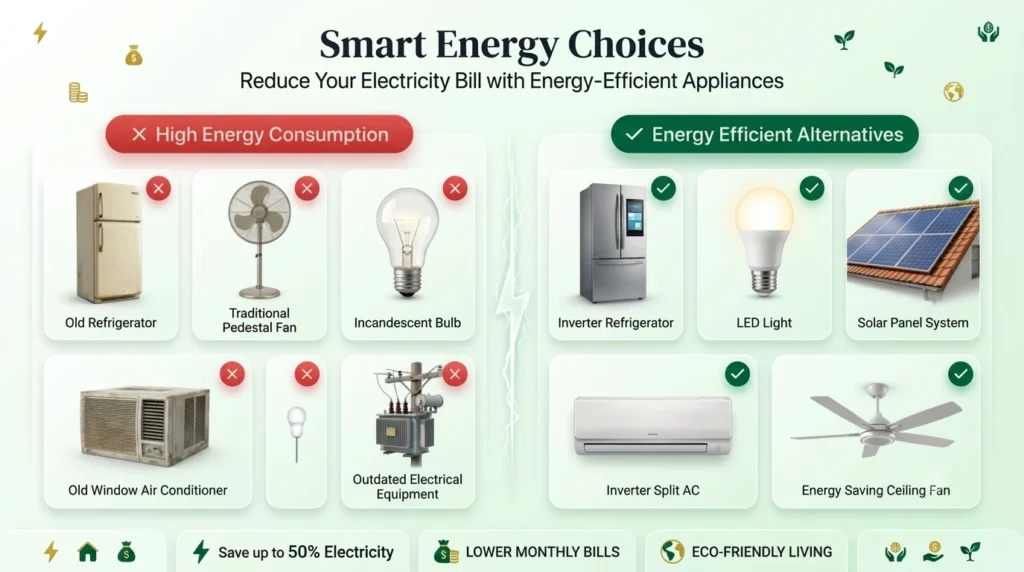
Smart Ways to Reduce Appliance Consumption
- Opt for energy-efficient options like inverter ACs, LED lighting and smart thermostats; they consume noticeably less power over time.
- Keep your appliances well-maintained. Something as simple as cleaning your AC filters regularly can improve performance and reduce power usage.
Practical Tips to Lower Your Electricity Bill
- Turn off lights, fans and appliances whenever they are not in use.
- Switch to LED or energy-saving bulbs instead of traditional ones.
- Use your AC wisely and rely on fans during moderate weather instead of running the AC unnecessarily.
Even small, consistent changes in daily habits like these can make a noticeable difference helping you cut down your electricity consumption and keep your monthly IESCO bill lower over time.
Tips to Reduce Your IESCO Bill
A lower electricity bill isn’t about cutting comfort, it’s about building a few smart habits that add up over time. Here are some practical tips that can genuinely make a difference in your monthly IESCO bill:
- Go for Energy-Efficient Appliances: Switching to LED bulbs and energy-efficient appliances can cut down your power consumption significantly over time.
- Turn Off What You’re Not Using: Lights, fans and devices left running unnecessarily are silent bill-boosters that switch them off when not needed.
- Avoid Peak Hours for Heavy Appliances: Try to avoid running heavy appliances like the AC or washing machine during peak hours since units consumed during this time are charged at a higher rate.
- Set Your AC Wisely: Keep your air conditioner at a moderate temperature instead of the lowest setting it saves more energy than you’d expect.
- Maintain Your Appliances Regularly: Clean filters, proper servicing and timely maintenance keep appliances running efficiently and consuming less power.
- Make the Most of Natural Light: During the day, rely on natural light and ventilation instead of switching on lights and fans unnecessarily.
These small, consistent changes may seem minor individually but together they can noticeably bring down your monthly electricity bill without compromising on your daily comfort.
How to Register Your CNIC with IESCO
Registering your CNIC with IESCO is a quick, one-time process and it ensures your electricity connection stays properly linked to your identity. Once done, it makes everything from complaints to bill management a lot smoother.
Why CNIC Registration Matters
- Confirms that you’re the rightful owner of the electricity connection
- Makes it easier to track and resolve complaints
- Required for new connections ownership transfers or any corrections
- Allows you to receive SMS alerts and e-billing notifications directly
How to Register Your CNIC
Option 1: Visit Your Nearest IESCO Office
Head to your nearest Sub-Division Office with:
- A copy of your CNIC
- Your latest electricity bill
Simply ask the staff to link your CNIC with your reference number and it’ll be updated in their system.
Option 2: Register Online
If you’d rather skip the visit you can do it from home:
- Go to the official IESCO website and open the Customer Services section
- Enter your Reference Number along with your CNIC details
- Submit your request and IESCO will process the registration
IESCO Helpline & Customer Support
Facing a billing issue, power outage or need help with a new connection? IESCO Helpline has a dedicated support system in place to make sure every consumer gets timely help whether you prefer calling, emailing or visiting an office in person.
IESCO Helpline Number
For any query, complaint or suggestion, you can reach IESCO directly at 051-9252937. This helpline covers billing issues, service interruptions and general customer support.
Email Support
If you’d rather write in, you can send your complaint directly to the IESCO CEO at ce@iesco.com.pk useful for unresolved issues or formal complaints that need higher-level attention.
Billing Complaint Resolution Desk
For billing-related disputes, visit the Billing Complaint Resolution Desk at the IESCO
E-Kachehri Service
Want to avoid visiting an office altogether? IESCO’s E-Kachehri initiative lets you register and track complaints online, saving you the trip.
SMS & Email Alerts
Subscribe to IESCO’s notification service to get timely updates about your bill, power outages and other important announcements directly via SMS or email, so you never miss critical information.
Nearest IESCO Customer Care Centers
| Office | Address | Phone | Mobile |
|---|---|---|---|
| Head Office, Islamabad | Street #40, Sector G-7/4, Islamabad | 051-9252937 | – |
| Blue Area, Islamabad | Behind Shaheed-e-Millat, China Chowk, Blue Area | 051-9244301-2 | 0307-8881783 |
| G-9 Islamabad | Plot No. 7-B, G-9 Markaz | 051-2285931 | 0307-8881780 |
| Swan Garden, Islamabad | Plot #1, St #4, F-Block, Shalimar Road | 051-5738621 | 0307-8881773 |
| Chandni Chowk, Rawalpindi | Chandni Chowk, Rawalpindi | 111-309-309 | 0307-8881776 |
| Marrir Hassan, Rawalpindi | Marrir Hassan, Rawalpindi | 051-9292692 | 0307-8881782 |
| Chakri, Rawalpindi | Chakri Interchange, Rawalpindi | 0514-675245 | 0307-8881772 |
| Attock | Near Jamia Masjid, Islamia High School, Attock City | 057-2702756 | 0307-8881774 |
| Taxila | GT Road, Near Lari Adda, Taxila | 051-9314162-63 | 0307-8881778 |
| Fateh Jang | Near NADRA Office, Fateh Jang | 057-2212067 | 0307-8881781 |
| Jhelum | GTS Chowk, Jhelum Cantt | 0544-9270169 | 0307-8881501 |
| Chakwal | Tehsil Chowk, Zila Council Plaza, Chakwal | 0543-553279 | 0307-8881775 |
Quick Tip: For general queries dialing 118 also connects you to your nearest IESCO customer care center across most regions.
What is IESCO Bill Check & Why It Actually Matters
The Islamabad Electric Supply Company serves as the main electricity provider for the federal capital and surrounding regions, including Attock, Jhelum and Chakwal. With the IESCO online bill check service, you don’t have to wait for a physical copy to know what you owe. You can view, download and print your bill digitally, often days before the paper version even reaches your home.
Why Going Digital Just Makes More Sense
- Convenience: Check your bill anytime, from anywhere whether you’re at home at work or even out of the country, as long as you have internet access.
- Instant Access: No more depending on the mail carrier or worrying about a delayed delivery.
- Accuracy: Reviewing your bill online lets you double-check meter readings and consumption details, helping you catch any errors before you pay.
Benefits of Online Islamabad Electric Supply Company Bill Check
Managing your electricity bill online comes with some real, everyday advantages:
- Saves Time: No need to visit an office or wait around for the postman. Your bill is just a few clicks away.
- Available 24/7: Whether it’s midnight or a public holiday, you can check your bill whenever it suits you.
- Better Budgeting: Families and small businesses can plan their monthly expenses in advance, even before the paper bill arrives.
- Eco-Friendly: Going digital means less paper printing, which is a small but meaningful step for the environment.
FAQs
Conclusion
Checking your IESCO bill no longer means waiting for the postman or standing in line at an office. Just enter your 14-digit Reference Number or Customer ID and within seconds, your bill is ready to view, download or print completely free and with no login required. Whether you’re checking your current bill, retrieving a lost duplicate copy or simply trying to understand terms like FPA and surcharges, this guide brings everything you need into one place.
Making it a habit to check your bill on time helps you avoid late fees, plan your monthly budget better and catch any billing errors before they become a problem. So the next time your IESCO bill is due, skip the office visit just grab your reference number and have your bill in hand in seconds.