IESCO New Connection
Applying for a new electricity connection from Islamabad Electric Supply Company can feel confusing if you don’t know where to start. Between the paperwork, the demand notice and the waiting period, a lot of people end up making small mistakes that delay their connection by weeks.
This guide breaks down the entire IESCO New Connection process in plain language what documents you need, how much it costs, how long it takes and how to avoid the common errors that slow people down.
IESCO supplies electricity to Islamabad, Rawalpindi, Attock, Jhelum and Chakwal, covering residential, commercial, industrial and agricultural consumers across these regions.
You can check and download your IESCO bill online in seconds.
Who Can Apply for a New IESCO Connection?
You’re eligible to apply if you fall into any of these categories:
- Homeowners setting up a residential supply
- Shopkeepers and businesses needing a commercial meter
- Factories and industrial units requiring higher load connections
- Farmers needing power for tube wells or irrigation
- Builders/contractors who need a temporary connection for a construction site or event
The only requirement is that you either own the property or have written permission an NOC from the owner to apply on their behalf.
Types of IESCO Connections
| Connection Type | Used For |
|---|---|
| Residential | Homes, apartments, personal-use lighting and appliances |
| Commercial | Shops, offices, restaurants |
| Industrial | Factories, mills, heavy machinery |
| Agricultural | Tube wells, irrigation pumps |
| Temporary | Construction sites, exhibitions, events |
Choosing the right category matters applying under the wrong type can cause your application to be rejected during verification. Our tariff category guide explains the main billing categories.
Documents Required for IESCO New Connection
Before you start the application, get these ready. Missing even one document is the #1 reason applications get delayed.
For all applicants:
- Attested copy of the applicant’s CNIC (both sides)
- Attested copy of one witness’s CNIC
- Proof of ownership or tenancy registry, allotment letter, property tax receipt or rental agreement
- No Objection Certificate NOC from the landlord
- A copy of a neighbor’s IESCO bill used as a location reference
- Site plan or approved building layout
- An undertaking confirming there no previous connection at the property and no outstanding dues
- Wiring test report from a licensed electrician or wiring contractor
- Power of attorney, if someone is applying on your behalf
Additional documents for commercial/industrial/agricultural connections:
- Business registration documents (NTN certificate, business license)
- Partnership deed or certificate of incorporation, for registered companies
- Board resolution authorizing a representative to sign the supply contract
- Load estimate showing expected electricity usage
- For stone crushing plants specifically: an NOC from the Environmental Protection Agency
Tip: Make two complete sets of every document one to submit, one to keep for your own record. If you’re applying as a tenant, the landlord’s CNIC copy is also required and the landlord remains responsible for unpaid dues if you default for three consecutive months.
How to Apply Step by Step Process
Check the current application route on the official IESCO website before applying. IESCO advertises e-OPS through its supported apps and facilitation centers; follow the current official instructions for your connection type.
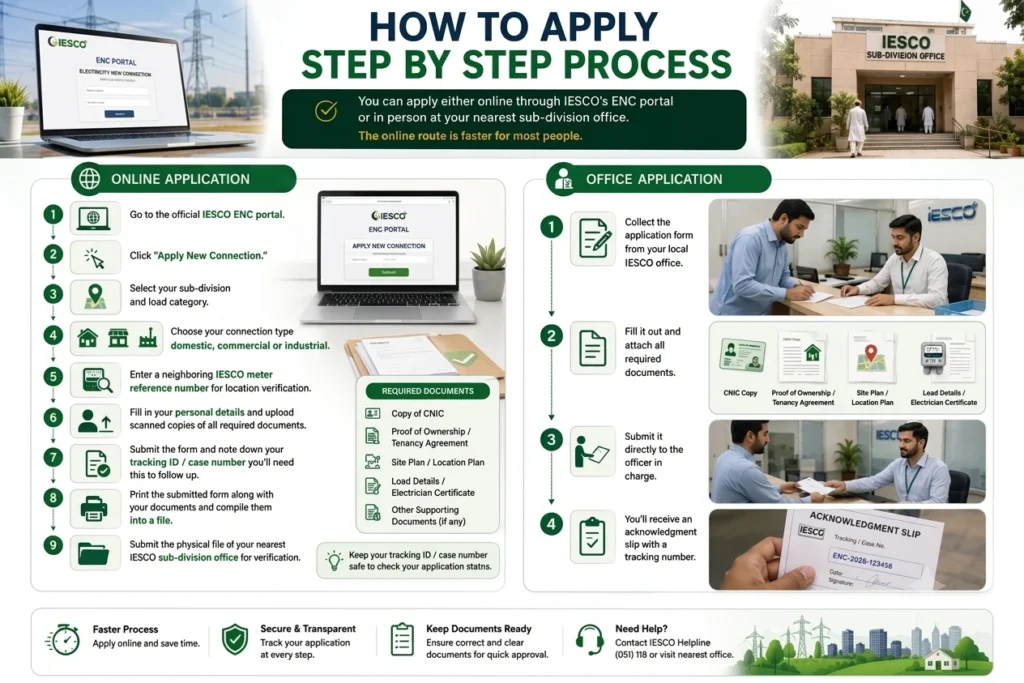
Online Application
- Open the official IESCO website and use its current new-connection instructions. Confirm whether your application belongs in e-OPS or another officially linked service.
- Click “Apply New Connection.”
- Select your sub-division and load category.
- Choose your connection type domestic, commercial or industrial.
- Enter a neighboring IESCO meter reference number for location verification.
- Fill in your personal details and upload scanned copies of all required documents.
- Submit the form and note down your tracking ID / case number you’ll need this to follow up.
- Print the submitted form along with your documents and compile them into a file.
- Submit this physical file at your nearest IESCO sub-division office for verification.
Office Application
- Collect the application form from your local IESCO office.
- Fill it out and attach all required documents.
- Submit it directly to the officer in charge.
- You’ll receive an acknowledgment slip with a tracking number.
IESCO New Connection Charges 2026
Connection costs depend on your meter type and the length of the service line needed to reach your property.
Single Phase Meter
| Service Line Length | Charges |
|---|---|
| Up to 20 meters | Rs. 8,500 |
| 21 – 30 meters | Rs. 10,500 |
| 31 – 40 meters | Rs. 11,500 |
| 41 – 100 meters (one LT span, one pole) | Rs. 11,000 + Rs. 800 per meter above 40m |
| 101 – 160 meters (two LT spans, two poles) | Rs. 60,000 + Rs. 1,000 per meter above 100m |
Three Phase Meter
| Service Line Length | Charges |
|---|---|
| Up to 20 meters | Rs. 36,500 |
| 21 – 30 meters | Rs. 43,000 |
| 31 – 40 meters | Rs. 50,000 |
| Above 40 meters | Actual material cost as per IESCO’s latest rate bulletin |
Beyond the basic connection fee, you may also pay for:
- Security deposit — refundable, based on your sanctioned load
- Electrification design vetting charges — 1.5% of material cost, applicable only for housing societies, high-rises and commercial plazas
- Installation charges — typically 8% of material cost
- Underground wiring or special equipment — only if requested or required for industrial loads
These charges are regulated by NEPRA under the Distribution License rules, so they’re standardized not something IESCO can arbitrarily change once your Demand Notice is issued.
How Long Does It Take?
Processing time depends on your sanctioned load. Here’s the official timeline by category:
| Load / Voltage | Maximum Processing Time |
|---|---|
| Up to 400V, load up to 15 kW | 30 days |
| Up to 400V, load 15–70 kW | 53 days |
| Up to 400V, load 70–500 kW | 73 days |
| Up to 400V, load 500–5000 kW | 106 days |
| 66 kV and above (any load) | Assessed case-by-case |
In practice, a standard residential connection (Category 1, up to 15 kW) often completes faster many applicants report their meter installed within 4 to 7 weeks if documents are correct and the site survey goes smoothly on the first attempt.
How to Track Your Application
Once you’ve paid your Demand Notice, you can check your application status online using either your CNIC number or the tracking/reference ID issued at submission. This lets you see exactly which stage your application is at verification, survey, demand notice or installation without having to call or visit the office. If tracking is unclear, consult the IESCO helpline guide with your application reference.
Common Mistakes That Delay Your Connection
- Submitting incomplete documents — always recheck your list before submitting
- Mismatched details — name spelling, CNIC number or address that doesn’t match your ownership proof
- Restricted site access — make sure the IESCO survey team can physically access the site
- Late payment of the Demand Notice — delays here push your installation date back
- Not tracking your case — following up proactively often resolves stuck applications faster
Expert Tips for a Faster Connection
- Apply well before you actually need power don’t wait until the last minute.
- Keep extra attested copies of your CNIC and ownership documents on hand.
- Estimate your load accurately; under or overestimating can cause issues during the survey or with future billing.
- Save your tracking ID and any confirmation emails or screenshots from the online portal.
- For urgent matters, an in-person visit to the sub-division office is often faster than waiting on a phone call.
- If you’re a tenant, get the NOC and landlord’s CNIC sorted upfront this single document causes the most delays for rental properties.
After Your Connection Is Active: Saving on Your Bill
Once your meter is installed, a few habits go a long way in keeping your electricity bill manageable: Use the bill calculator for budgeting, and follow the bill payment guide when your official bill is issued.
- Turn off lights, fans and appliances when rooms are unoccupied
- Choose energy-efficient appliances and LED lighting
- Make use of natural daylight and ventilation where possible
- Insulate your home to reduce heating and cooling load
- Get electrical wiring and equipment checked periodically for efficiency and safety
FAQs
Conclusion
Getting a new IESCO connection isn’t complicated once you know the sequence: gather your documents correctly, apply, pass the site survey, pay your Demand Notice on time and wait for installation. Most delays come from incomplete paperwork or missed follow-ups not from IESCO process itself. Prepare properly, track your application and you’ll have power running well within the official timeline.